

Quick answer: Sudowrite is the best AI writing tool made just for fiction, and it's great at helping you plan and draft a full novel. But when I gave it a romance scene — the slow-burn, tension-filled kind Romance Nerds readers love — it held back. The writing was fine but a little flat, and the second things got steamy, it shut the door.
So: if you write sweet or closed-door romance, Sudowrite is a solid (if pricey) pick. If you write spicy, open-door romance, you'll keep fighting the tool — and something built for that, like SmutFinder, gets you there faster. Here's the full breakdown.
I test a lot of AI writing tools for this newsletter, and I always hope each one will be great. Fewer blank-page mornings. Faster drafts. A little help when a scene won't move. That's the dream all these tools are selling.
Sudowrite sells it better than most. Unlike the general-purpose AI tools most people know, it was built just for fiction writers — not marketers or businesses. That’s a real difference, and it’s why it keeps topping “best AI for fiction” lists.
This Sudowrite review is based on real hands-on testing — I actually gave it a romance scene and watched what it did. Then, because I wasn’t happy with the result, I ran the same scene through a spice-focused tool to compare.
This is my honest take — the good, the annoying, and the part most reviews skip because they only test it on fantasy or thrillers.
What is Sudowrite?
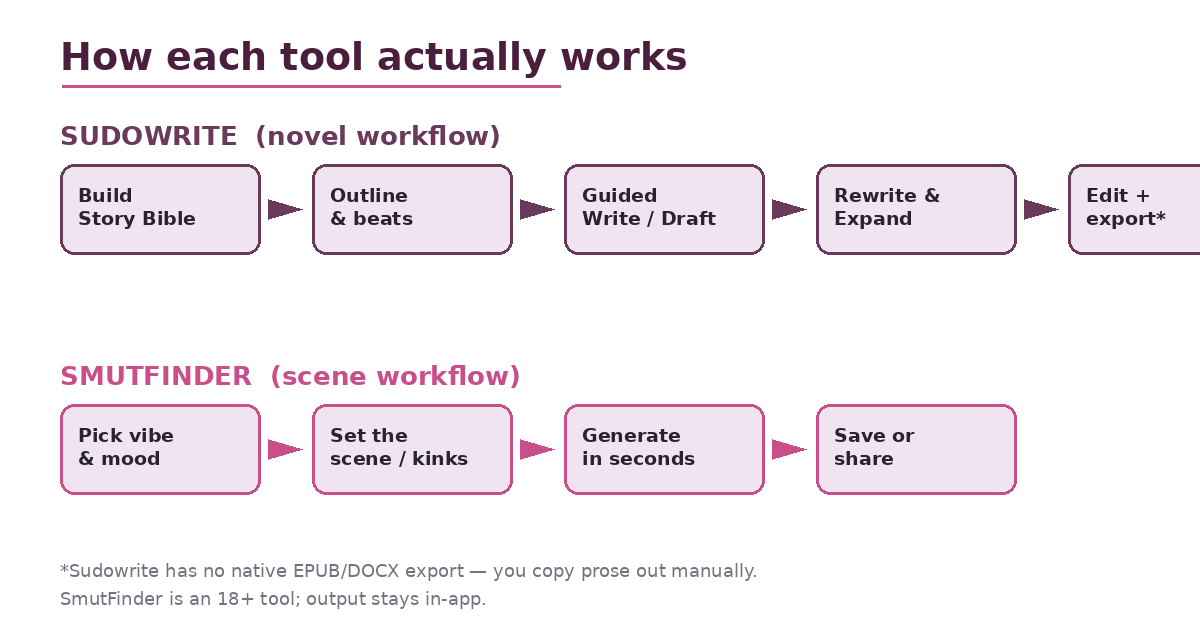
Sudowrite is an online AI writing tool made only for fiction. Before we get into my full Sudowrite review, here's a quick look at what the tool actually offers. What makes it different from a normal chatbot is a set of tools built for storytelling:
Muse — its own AI model, trained to write like a novel, not a business email. It understands scenes, dialogue, and pacing better than a general AI.
Story Bible — one place to store your characters, world, and outline. The AI reads it so your story stays consistent from chapter to chapter.
Guided Write / Draft — you give it a sentence or a few notes, and it continues the scene the way you want.
Expand, Rewrite, Describe — editing tools to build out short scenes, turn “telling” into “showing,” and add sensory detail.
Brainstorm & Twist — idea helpers for dialogue, plot points, and plot twists.
Put together, it feels less like one tool and more like a full writing studio. That’s its biggest strength — and, as you’ll see, also part of the problem.
Sudowrite Review: I Put It to the Test With a Romance Scene
I gave Sudowrite a simple, on-brand scene: a second-chance story where two former partners are forced back together after years apart. It's one of the most popular setups in the genre, so it's a fair test.
I set up the Story Bible properly — names, backstory, each character’s emotional wound, and the voice I wanted (warm, a little witty, sensory). Then I used Guided Write and Expand, just like a real romance author would.
What it got right
The setup and tension were genuinely good. Muse got the assignment. It kept both characters in the room, remembered their history, and built that heavy, loaded-silence mood that makes second-chance romance work. The dialogue had subtext. Nobody suddenly forgot they were upset. For a slow burn, it delivered.
The Describe tool was also impressive. When a paragraph felt flat, it added weather, firelight, and body language across the senses without me spelling it all out. If you struggle with description, this feature alone is worth a look.
Where it fell apart
Two problems — and both matter more for romance than any other genre.
Problem 1: the writing feels a little empty. You mostly notice it on the second read. The prose was clean and correct… but slightly hollow. That smooth, generic “AI” feeling crept in. And in romance, your voice is the whole product. Readers follow a romance author because of how they make longing feel, not because the grammar is neat. Left alone, Sudowrite slowly smooths your voice into something pleasant but generic. You can push back with the Story Bible and lots of editing — but you are pushing back the whole time.
Problem 2 (the big one): it closes the door. When the story reached the point where a spicier romance would turn up the heat, Sudowrite backed away. It faded to black, swapped clear details for vague hints, and pulled things back to “safe” emotional ground. For sweet or closed-door romance, that’s fine — even helpful. But if you write open-door romance, where the spice is the scene, you’ll hit this wall again and again. No amount of clever prompting fully fixes it, because it’s built into how the tool works.
That’s the part fantasy and thriller reviewers never mention. For our genre, it’s the whole ballgame.
How Much Does Sudowrite Cost?
No Sudowrite review would be complete without talking honestly about the price — and this is where a lot of writers get caught off guard.
Sudowrite runs on a credit system — every AI action uses credits, and stronger models like Muse use them up faster.
Hobby & Student — $19/mo ($10 if you pay yearly) · 225,000 credits/mo
Professional — $29/mo ($22 yearly) · 1,000,000 credits/mo
Max — $59/mo ($44 yearly) · 2,000,000 credits/mo, with rollover
Two honest warnings. First, the $19 plan’s credits disappear fast if you actually draft with Muse — a lot of reviewers call it a “trap” for serious writing and say you’ll end up on the $29+ plan. Second, the bigger issue: Sudowrite can’t export your book. No EPUB, DOCX, or PDF. You’re using a tool built for authors that can’t hand you a finished manuscript file — you have to copy your writing out and format it somewhere else. For a paid 2026 tool, that’s a real letdown.
There’s a free trial with no credit card needed, so definitely try it before you pay.
Sudowrite Alternatives For Spicy Romance: SmutFinder
Since Sudowrite kept holding back, I went looking for Sudowrite alternatives built for the spicier side of romance — and the one that stood out was SmutFinder, a tool made specifically for adult, open-door romance. (It’s 18+ only, worth saying clearly.)
The difference was instant. Where Sudowrite hesitated, SmutFinder just… wrote the scene. You pick a vibe, set the scene, choose the mood and heat level, and it writes spicy prose in seconds — without a filter fighting you the whole way. For the spicier side of romance, that alone removes the most frustrating part of my Sudowrite test.
A few things I honestly liked:
No fighting a filter. For open-door romance, this is everything. It leans in instead of fading out.
Super easy to use. A simple four-step process versus Sudowrite’s learning curve. You get usable spice in minutes.
Cheap. A free tier, then $4.99/mo (Plus) and $9.99/mo (Premium) — way less than Sudowrite’s serious plans.
Privacy-focused, which matters a lot if you’re writing adult content and want it kept private.
To be fair, it’s not a full novel-writing suite. There’s no Story Bible for keeping a 90,000-word book consistent, and like Sudowrite, it won’t export a formatted book either. It’s a specialist. But for the one thing romance readers here always want more of — the spice — it did the job Sudowrite wouldn’t.
The Tool I Liked Better for Spice: SmutFinder
Since Sudowrite kept holding back, I ran the same steamy scene through SmutFinder — a tool made specifically for adult, open-door romance. (It’s 18+ only, worth saying clearly.)
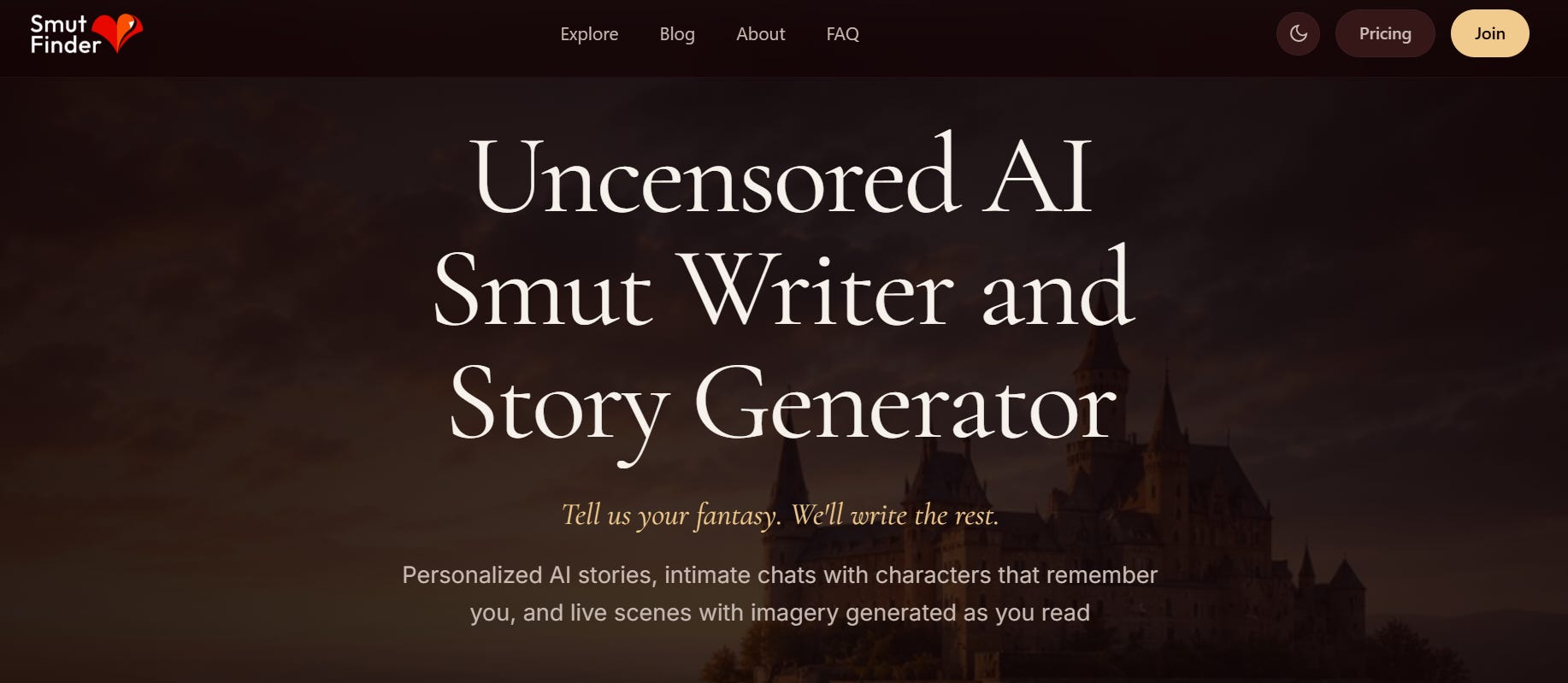
The difference was instant. Where Sudowrite hesitated, SmutFinder just… wrote the scene. You pick a vibe, set the scene, choose the mood and heat level, and it writes spicy prose in seconds — without a filter fighting you the whole way. For the spicier side of romance, that alone removes the most frustrating part of my Sudowrite test.
A few things I honestly liked:
No fighting a filter. For open-door romance, this is everything. It leans in instead of fading out.
Super easy to use. A simple four-step process versus Sudowrite’s learning curve. You get usable spice in minutes.
Cheap. A free tier, then $4.99/mo (Plus) and $9.99/mo (Premium) — way less than Sudowrite’s serious plans.
Privacy-focused, which matters a lot if you’re writing adult content and want it kept private.
To be fair, it’s not a full novel-writing suite. There’s no Story Bible for keeping a 90,000-word book consistent, and like Sudowrite, it won’t export a formatted book either. It’s a specialist. But for the one thing romance readers here always want more of — the spice — it did the job Sudowrite wouldn’t.
So Which One Should You Use? Sudowrite or Smutfinder
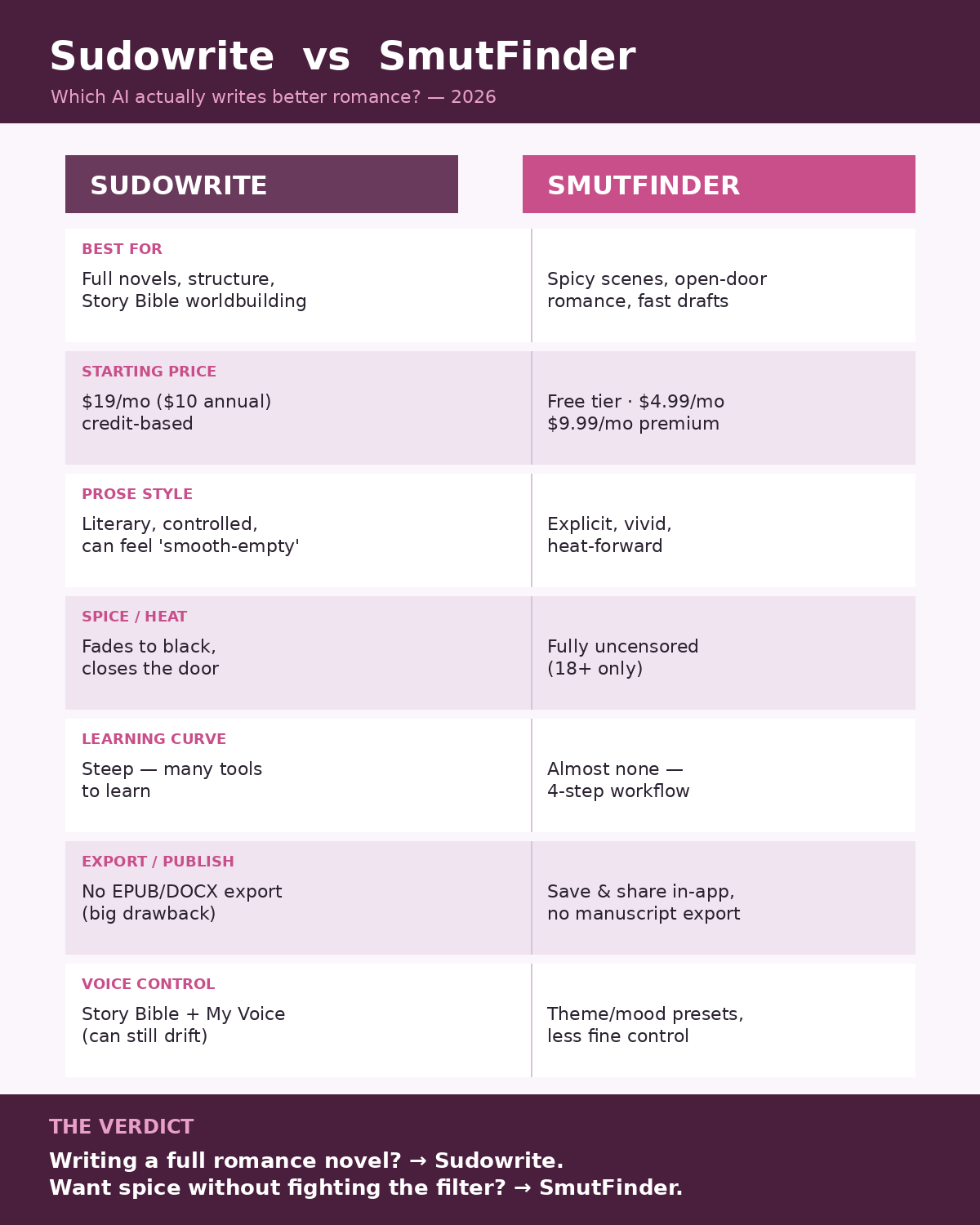
This isn’t really “good tool vs bad tool.” It’s about matching the tool to what you actually write.
Choose Sudowrite if you:
are writing a full-length novel, especially sweet or closed-door romance
want help with structure — outlining, Story Bible, keeping chapters consistent
like clean, polished prose and don’t mind editing to keep your voice
are okay with the credit-based pricing
Choose SmutFinder if you:
write open-door or spicy romance and are tired of tools that fade to black
want speed and almost no learning curve
are on a tighter budget
care about privacy for adult writing (again — 18+)
Honestly, a lot of writers here will use both: Sudowrite to plan and draft the story, and a spice-focused tool for the scenes Sudowrite won’t write. That’s not cheating — it’s just using each tool for what it’s actually good at.
The Verdict
To wrap up this Sudowrite review: it's genuinely great software and the best general AI tool for fiction I've tried. But “best for fiction” and “best for romance” aren’t the same thing. The way it smooths out your voice — and the way it shuts the door right when a romance scene gets interesting — are real problems for our genre. Not dealbreakers for everyone, but dealbreakers for anyone whose readers came for the heat.
Try Sudowrite free before you pay, go in knowing about the credit system and the missing export, and be honest about how spicy your writing really gets. If the answer is “very,” you’ll want a spice specialist in your toolkit too.
👉 Try them yourself
Try Sudowrite free (no credit card) and run your own scene through it — it’s the only way to know if the flat-voice thing bothers you: sudowrite.com
Write open-door romance? Try SmutFinder’s free tier and see the difference on a spicy scene yourself (18+): smutfinder.com
💌 If this saved you from wasting money on the wrong tool, subscribe to Romance Nerds. I test the AI tools, spice-rank the books, and write the deep-dives so you don’t have to — new reviews and rankings every week, straight to your inbox.
Disclosure: This review is based on hands-on testing and publicly listed pricing and features as of 2026. Tools change often — check each site for current details before subscribing. SmutFinder is an adult (18+) platform.